Free Online Player for Live Channels: Tips for Better Viewing
free online player for live channels
Watching live television and online channels has become easier as streaming technology continues to develop. Instead of relying only on traditional television services, viewers can use different online platforms and media players to access live content through an internet connection. A free online player for live channels can be a convenient option for users who want a simple way to organize and watch compatible live streams.
However, getting a smooth viewing experience depends on more than simply opening a player. Internet speed, device compatibility, stream quality, playlist organization, and player features can all affect performance. Understanding these factors can help viewers make better choices and enjoy live streaming with fewer interruptions.
Understanding a Free Online Player for Live Channels
A free online player for live channels is a web-based or software-based media player designed to play supported live video streams. Depending on the platform, users may be able to add compatible streaming links, playlists, or other sources and then access available channels through one interface.
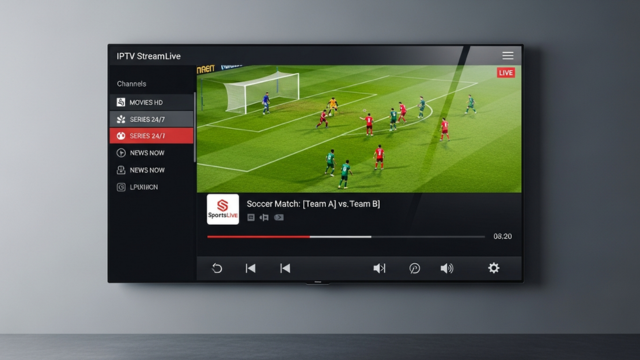
The player itself does not necessarily provide television content. In many cases, it works as a tool for playing streams that users are legally entitled to access. This distinction is important because the availability and legality of particular channels can vary depending on the source, location, and licensing arrangements.
Check Your Internet Connection
One of the most important factors affecting live streaming is internet stability. Even a well-designed player may experience buffering when the connection is slow or inconsistent.
For standard-definition streams, a basic broadband connection may be sufficient, while higher-quality HD or 4K streams generally require greater bandwidth. Users should also consider other devices connected to the same network. Downloads, gaming, video calls, and multiple streaming sessions can consume bandwidth and affect playback.
A stable connection is often more important than simply having a high advertised internet speed. Testing the connection before watching an important live program can help identify potential problems.
Choose the Appropriate Video Quality
Many streaming players allow users to select different video quality levels. Higher resolution can provide a sharper picture, but it also requires more bandwidth and processing power.
If a stream constantly pauses or buffers, reducing the quality may improve playback. Users with a strong connection and modern device can usually select higher-quality options when available.
Adaptive streaming can also be useful because it automatically adjusts video quality according to changing network conditions. When choosing a player, this can be a useful feature to consider.
Use a Compatible Device
Device compatibility can have a major impact on the viewing experience. A free online player for live channels may work differently on desktop computers, smartphones, tablets, smart TVs, and streaming devices.
Before selecting a player, users should check whether it supports their preferred operating system and browser. Keeping the browser, operating system, and relevant media components updated can also help prevent compatibility issues.
For television viewing, a larger screen may provide a better experience, but the device must still support the required streaming format.
Organize Available Channels
When a player supports multiple channels or playlists, organization becomes increasingly important. A long, unorganized channel list can make it difficult to find specific content.
Users can improve navigation by creating categories or favorites when the player provides these features. For example, compatible channels might be organized into categories such as news, sports, entertainment, documentaries, or international content.
A clean channel structure reduces the amount of time spent searching and makes the overall interface easier to use.
Keep Playlists and Sources Updated
Streaming sources can change over time. A channel that worked previously may become unavailable, move to a different address, or change its streaming format.
Regularly checking and updating compatible playlists can help maintain a more reliable viewing experience. Users should remove inactive entries and keep only sources they trust and are authorized to access.
This is particularly useful for people who maintain large collections of live channels.
Consider Player Features
Not every player offers the same functionality. When comparing options, users may want to consider features such as favorites, search, playlist support, electronic program guides, subtitles, multiple audio tracks, playback controls, and compatibility with different streaming formats.
A simple player may be sufficient for occasional viewing, while users who regularly watch multiple channels may benefit from more advanced organization and navigation features.
Protect Your Privacy and Security
Online streaming also requires basic security awareness. Users should be cautious when visiting unfamiliar websites or downloading unknown applications that claim to provide free access to live channels.
Avoid entering sensitive personal information into questionable services, and keep security software and browsers updated. When possible, use reputable platforms and legitimate streaming sources.
Free does not automatically mean safe, so checking the reputation and permissions of a service is an important part of responsible streaming.
Avoid Unnecessary Background Activity
Other applications running on a device can consume system resources and network bandwidth. Closing unnecessary downloads, cloud synchronization, browser tabs, and resource-intensive applications may help improve performance.
On older devices, reducing background activity can be especially useful when playing high-quality live video.
Conclusion
A free online player for live channels can provide a convenient way to watch compatible live streams through an internet-connected device. However, the quality of the experience depends on several factors, including internet stability, device compatibility, video quality, playlist organization, and the reliability of the streaming source.
By choosing an appropriate player, maintaining organized sources, adjusting video quality when necessary, and following basic security practices, viewers can create a smoother and more convenient live-streaming experience. The best approach is to focus not only on whether a player is free, but also on its compatibility, usability, reliability, and available features.
Web:- https://iptvplayer.stream/iptv-player
#freeonlineplayerforlivechannels